
The SMB Privacy Test for AI Tools
Bottom line: I see Google’s new Search Services History settings as a useful reminder, not the main event. The consumer privacy question is whether you remembered to opt out. The business privacy question is whether you can prove your company’s AI tools handle data the way you think they do. For SMBs, vendor promises aren’t enough, verification is the key.
What Just Happened
Google has started rolling out Search Services History and Personalized Recommendations settings for Search-related products, including Search, Maps, Shopping, Flights, Hotels, Translate, and News. One subsetting, Save Media, allows Google to save media such as images, files, audio, and video from interactions with features like Google Lens, voice search, Translate, and Search Live. But here’s where Google goes further, they indicate that saved media can be used to develop and improve Google services and technologies, including AI models and safety measures.
The opt-out is simple enough once the setting appears in your account: go to Google activity settings, open Search Services History, and turn off Save Media if you do not want those media inputs saved. Google says the rollout is gradual, so some accounts may still be controlled by older Web & App Activity settings for now.
For personal use, I see that as a reasonable privacy hygiene step. For business use, it barely scratches the surface.
What I’m Seeing
Default-on data collection is not unique to Google. LinkedIn moved to a default-on model for using member data to improve generative AI features in 2024 in certain regions. Meta has also used public Facebook and Instagram content for AI training, with stronger opt-out rights available in some regions than others, and don’t even get me going on the keylogging of employee work to train their AI. The pattern matters more than any single platform update.
What I am seeing is this: consumer platforms are tightening their grip on user-generated data because AI capability depends on data access. That is not shocking, it’s the operating model.
Where this gets risky for SMBs is everyday employee behavior. Free ChatGPT. Personal Gemini. A Claude account someone created at home and now uses to summarize client emails. That is where business data leaks most often: not through a dramatic breach, but through routine use of tools that were never approved, contracted, or governed for business data, and, oftentimes, where the business may not even be aware of their employees’ usage of these fantastic tools.
The key signal I see is that personal data and business data require different standards. Personal data is yours to manage. Business data is different. It can include intellectual property, client information, employee records, financial data, contracts, meeting transcripts, and internal strategy. In a business context, you are not just a user, you’re a steward, so there’s a whole different level of diligence necessary.
The Verification Problem
Most major AI vendors can tell a credible story about not training on business customer data. The catch is that the protection usually depends on the product tier, the contract, and the settings. It is not automatic just because the vendor has an enterprise product somewhere in the portfolio.
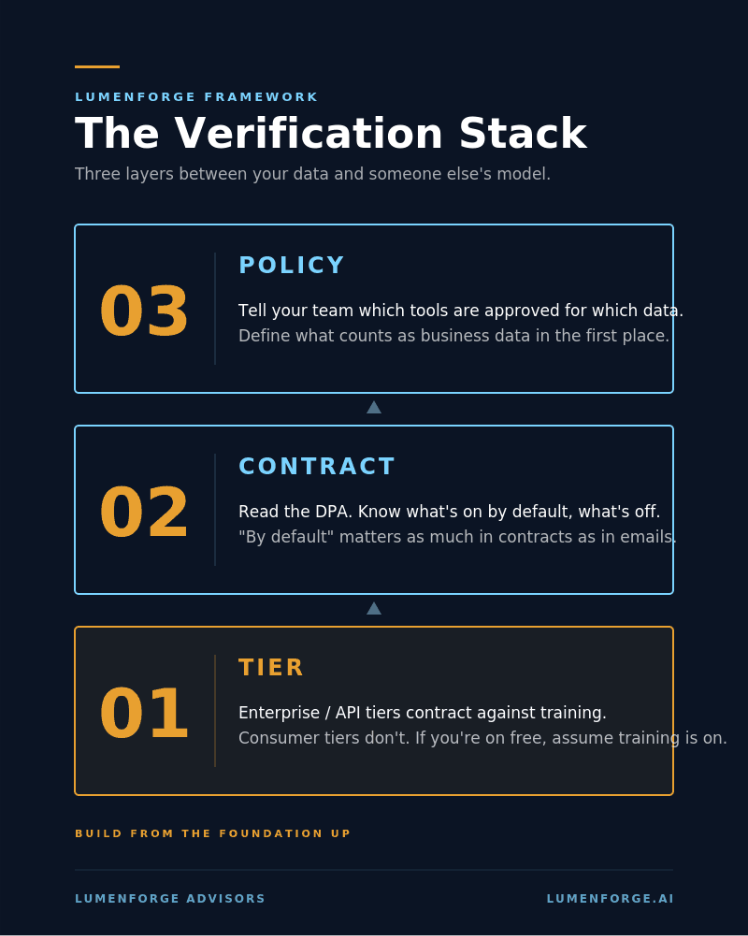
I would start with a three-part verification stack:
- Tier. Confirm whether your team is using consumer, team, enterprise, or API access. Consumer tiers often have looser data-use terms. Business and enterprise tiers are where stronger no-training commitments usually appear.
- Contract. Read the data processing terms. Look for model training language, retention periods, human review rights, subprocessors, deletion rights, and whether any opt-out is required. “By default” matters in a contract as much as it does in a privacy email.
- Policy. Tell your team which tools are approved and what data can go where. Be specific in your guidance, policy and allowable use standards. “Do not paste confidential information into AI tools” is not enough. Clearly define confidential information in plain language and give examples.
Tier, contract, policy. I see that as the minimum viable verification stack. Anything less is trust without proof.
The image I use for this is intentionally simple: Tier, Contract, and Policy stacked as the three checks that turn AI privacy from assumption into evidence. That framing works because it keeps the conversation out of the abstract. If a tool fails any one of those checks, I would strongly consider disqualification on the grounds that it is not ready for sensitive business data.
Where This Matters for SMBs
I expect this to keep happening and become more prolific. Platforms will continue changing defaults, reorganizing settings, and expanding what counts as product improvement data. That does not mean SMBs should panic or ban useful tools; it simply means they need an operating posture instead of a headline-by-headline reaction cycle.
Here is the SMB posture I recommend:
- Inventory. Find out which AI tools people actually use, not only the ones leadership approved.
- Classify. Decide what data can be used in consumer tools, what requires approved business tools, and what should not be entered into any AI system without review.
- Default to contracted tools. The cost of a business tier is usually small compared with the risk of exposing client, employee, or proprietary data through unmanaged consumer accounts.
- Re-check quarterly. Defaults change. Product terms change. Your approved-tool list and data-use rules need to change with them.
Net
Net: I see Google’s update as a small story by itself. The larger pattern is much greater. Personal privacy can often be managed with a setting. Business privacy requires a system.
The companies I expect to handle this well will not be the ones with the loudest AI policy. They will be the ones that can answer three questions clearly: what tools are approved, what data is allowed, and what contractual protection exists behind the answer.
If you cannot answer those questions today, I would not treat that as failure. I would treat it as your next operating priority.
Sources
- Google Search Help, “Get started with Search Services History & Personalized Recommendations.” https://support.google.com/websearch/answer/17025248
- JR Raphael, Computerworld, “How to opt out of Google’s new AI training default,” June 11, 2026. https://www.computerworld.com/article/4183788/google-ai-training-opt-out.html
- Andrew Romero, 9to5Google, “Google Search history now shows media you upload, how to disable,” June 22, 2026. https://9to5google.com/2026/06/22/google-saving-audio-images-used-to-search-how-to-turn-it-off/
- Jeff Rumage, Built In, “How to Opt Out of AI Training: 10 Ways to Protect Your Data,” April 27, 2026. https://builtin.com/articles/ai-training-data-opt-out
- Mandy Fard, LinkedIn, “How to Protect Your Privacy by Turning Off LinkedIn’s AI Data Settings,” October 3, 2024. https://www.linkedin.com/pulse/how-protect-your-privacy-turning-off-linkedins-ai-cprw-cmrw-lcboc
- Melissa Heikkilä, MIT Technology Review, “How to opt out of Meta’s AI training,” June 14, 2024. https://www.technologyreview.com/2024/06/14/1093789/how-to-opt-out-of-meta-ai-training/
Leave a Reply
You must be logged in to post a comment.